Overview
The Problem
My Contribution
The Solution
Impact
Takeaways

HoloSense Smart Vision - Building a web based data annotation tool to custom train video security systems
For Recruiters - What This Case Study Is About
Front-End UX Development
Error Handling & Hueristics
HoloSense Smart Vision is an intelligent camera vision training platform designed for the Chinese market to complement Huawei’s Security Camera ecosystem.
The platform empowers business & home owners using Huawei’s security systems to custom-train their cameras for a range of security, compliance, and operational scenarios.
As an Front-End SDE and UX Contractor, I spent 2 years building & scaling the web-based data annotation & camera training tool that would enable home/business owners to upload and custom-annotate photos and video footage to facilitate the training logic for the smart security system.
Jump to Solution
Year
2019 - 2022
For
Huawei Technologies
My Role
Front End & UX SDE Contractor
Tech Stack
VS Code, Postman, Angular, TypeScript, HTML, JS, CSS

Overview
What is Computer Vision?
Computer Vision is a field of artificial intelligence that enables machines to interpret and make decisions from visual data - such as images and videos. By mimicking human perception, computer vision systems can identify objects, detect motion, recognize patterns, and even understand complex scenes.
It powers applications ranging from facial recognition and autonomous driving to industrial inspection and smart surveillance, allowing computers to “see” and respond intelligently to the world around them.
The Problem
Come 2020 the World Stood Still - We Had a New Product Goal
We started product development with security-oriented use-cases in mind, but cut to early 2020, the COVID Pandemic gripped the general public and all forms of organized industry, bringing everything to a standstill. We had a new use case -
Ensuring and enforcing the strictest health & quality standards in the food packaging industry to prevent the collapse of food supply chains in a global pandemic was our new goal.
How Would This Product Help Business Owners and Operators?
We needed to build an easy-to-use web annotation platform that -
Allows users/businesses to mass upload images and video footage of their food prep/manufacturing & processing facilities. A good data sample set for computer vision training requires at least 2000 images and video samples per facility space/area.
With the uploaded images and footage, users need to be able to annotate and mark physical spaces or personnel for specific characteristics as positive or negative as per their use case. I therefore, built the core features of the data annotation tool within the web platform.
Communicate the effectiveness of the data annotation process after running the vision training model.
My Contribution!
Built key features of the data annotation tool
Implemented and scaled the design sytem, implementing UX, visual design & structure and interactive animations.
Built 40+ responsive components and webpages with REST API integration
Improved site performance & efficiency by reducing cyclometric complexity by 28%
I also served as the UX copywriter for the english version of the platform

The Solution - Architecture & UX Implementation
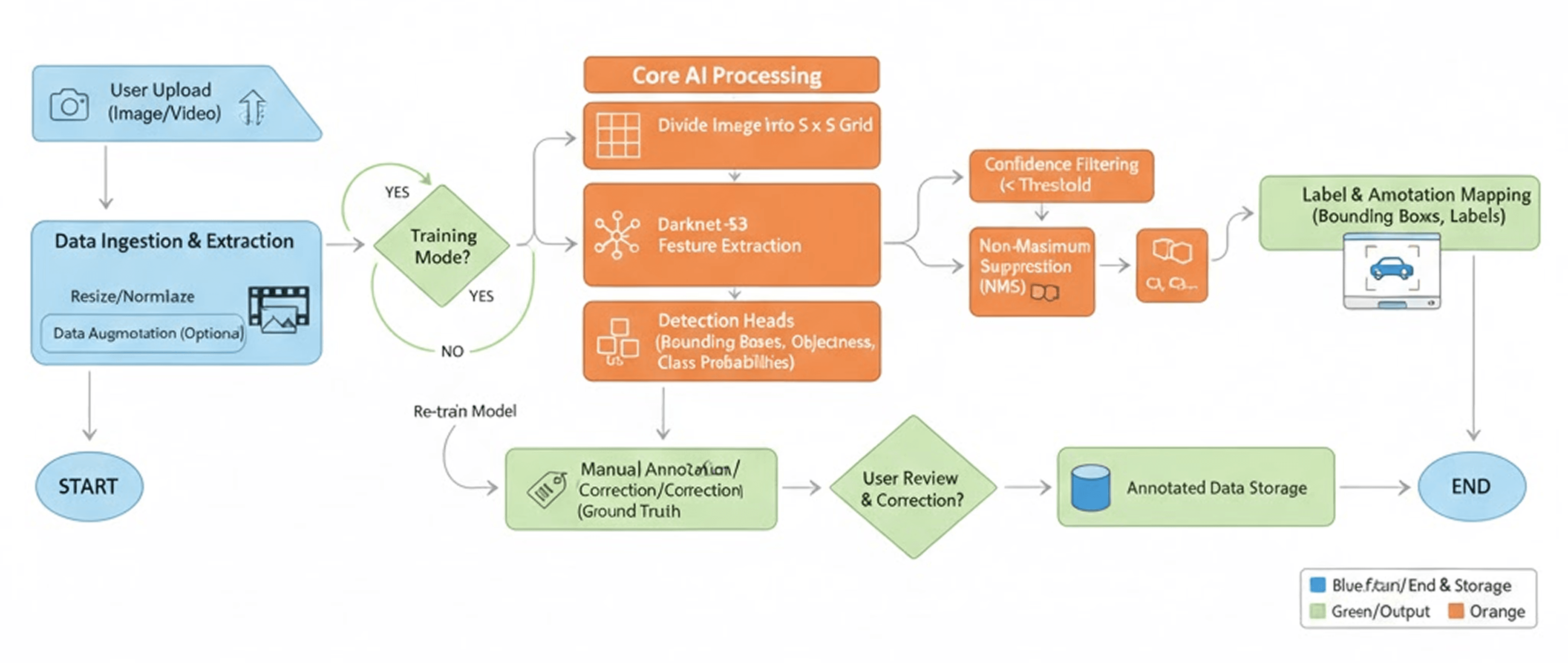
Data Ingestion & Extraction
The workflow begins when users manually upload image or video footage captured from their security cameras.o clarity, predictability, and transparency were critical. I designed the upload flow to provide immediate feedback - progress bars, file compatibility cues, error prevention states and ensured the system never leaves users uncertain about the status of their upload.
Image & Video Upload Flow
Image & Video Upload Flow
UX Considerations
The workflow begins when users manually upload image or video footage captured from their security cameras.
Data Annotation Workflow
Users needed a way to manually draw, edit, and confirm bounding boxes across hundreds - sometimes thousands of images. Early testing revealed that annotation processes tend cognitively demanding and highly repetitive, which meant the interface had to minimize friction at every step. I built the tool on HTML Canvas to enable smooth, real-time interactions, allowing users to drag, resize, zoom, and pan with minimal latency.
Data Annotation Tool
UX Considerations
The workflow begins when users manually upload image or video footage captured from their security cameras.
Impact
Come 2020 the World Stood Still - We Had a New Product Goal
We started product development with security-oriented use-cases in mind, but cut to early 2020, the COVID Pandemic gripped the general public and all forms of organized industry, bringing everything to a standstill. We had a new use case -
Ensuring and enforcing the strictest health & quality standards in the food packaging industry to prevent the collapse of food supply chains in a global pandemic.
We therefore needed to build an easy-to-use web annotation platform that -
Allows users/businesses to mass upload images and video footage of their food prep/manufacturing & processing facilities. A good data sample set for computer vision training requires at least 2000 images and video samples per facility space/area.
With the uploaded images and footage, users need to be able to annotate and mark physical spaces or personnel for specific characteristics as positive or negative as per their use case. I therefore, built the core features of the data annotation tool within the web platform.
Communicate the effectiveness of the data annotation process after running the vision training model.
Takeaways
Come 2020 the World Stood Still - We Had a New Product Goal
We started product development with security-oriented use-cases in mind, but cut to early 2020, the COVID Pandemic gripped the general public and all forms of organized industry, bringing everything to a standstill. We had a new use case -
Ensuring and enforcing the strictest health & quality standards in the food packaging industry to prevent the collapse of food supply chains in a global pandemic.
We therefore needed to build an easy-to-use web annotation platform that -
Allows users/businesses to mass upload images and video footage of their food prep/manufacturing & processing facilities. A good data sample set for computer vision training requires at least 2000 images and video samples per facility space/area.
With the uploaded images and footage, users need to be able to annotate and mark physical spaces or personnel for specific characteristics as positive or negative as per their use case. I therefore, built the core features of the data annotation tool within the web platform.
Communicate the effectiveness of the data annotation process after running the vision training model.
page undergoing updates